7. Frequently Asked Questions
7.1. What should I do if I get the error message “Missing project_info object” in my Flutter project?
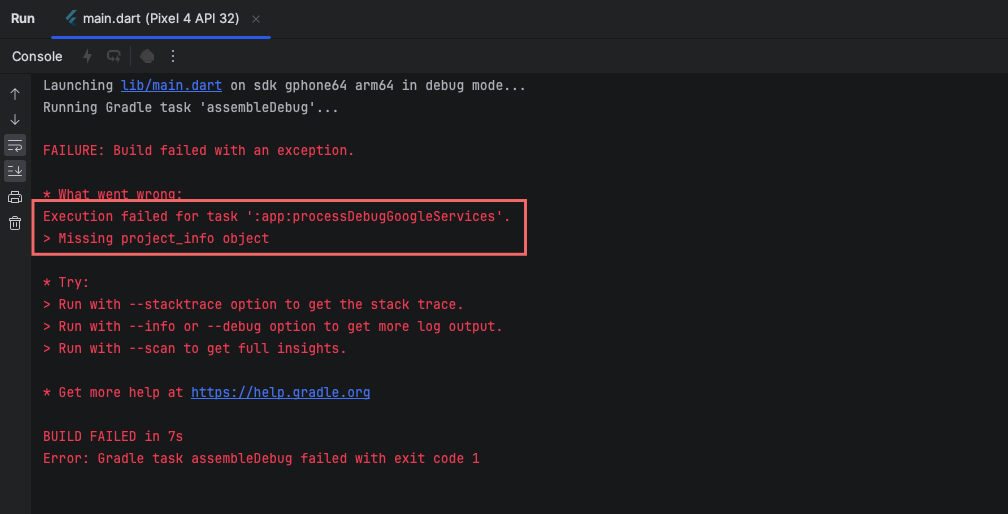
The error message you’re encountering, “Missing project_info object,” typically arises in Flutter projects when there’s a misconfiguration or missing information related to Firebase services. Here’s how you can troubleshoot and potentially resolve this issue
Solution :
1. Check google-services.json: If you’re using Firebase services in your Flutter app, ensure that you have the google-services.json file placed in the correct location within your Android project. This file contains important configuration information for Firebase services. It should be located in the android/app directory of your Flutter project.
2. Verify Firebase Setup: Double-check that you’ve completed all the necessary steps to set up Firebase for your Flutter project. This includes adding your app to the Firebase project using the Firebase Console, downloading and adding the google-services.json file to your Android project, and configuring Firebase services in your Flutter app’s code (if applicable).
3. Update Google Services Plugin: Ensure that you’re using the latest version of the Google Services Gradle plugin in your Android project. You can check the latest version on the Google Services Gradle Plugin page and update the version number in your android/build.gradle file accordingly.
4. Check Flutter and Firebase Versions Compatibility: Make sure that you’re using compatible versions of Flutter and Firebase. Sometimes, using outdated versions of either can lead to compatibility issues. Refer to the Firebase Flutter documentation and ensure compatibility with your Flutter version.
5. Sync Gradle Files: After making any changes to your Android project configuration, such as updating the google-services.json file or modifying the Gradle build files, make sure to sync your Gradle files in Android Studio. This can be done by clicking on the “Sync Project with Gradle Files” button.
6. Rebuild the Project: After ensuring all configurations are correct, try rebuilding your Flutter project. You can do this by running flutter clean followed by flutter pub get and then rebuilding the project (flutter run or flutter build).
7. Check for Error Logs: Look for more detailed error messages or stack traces in the console output or build logs. These can provide additional clues about the underlying issue causing the “Missing project_info object” error.



